I have forgotten my password - how can I retrieve it? ▼
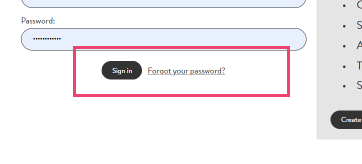
Simply click the 'Forgotten password' button on the login screen to reset your password. It will immediately send you an email for you to reset your password and then log in immediately.
I can't see prices when viewing products? ▼
Prices can be seen ONLY when you are logged in. If you are logged in and cannot see prices, please contact [email protected]
Are multiple logins for one account possible? Can I have a separate login for a new member of staff? ▼
Yes, we can create separate logins for different team members to access your account. Please email [email protected] with your request
When will my order be delivered? ▼
Ordering via our website is the fastest way for us to process and deliver your order. Order updates will be available soon via the Your Account area. For now, any order update queries should be sent to [email protected]
Can I save an order and come back to it? ▼
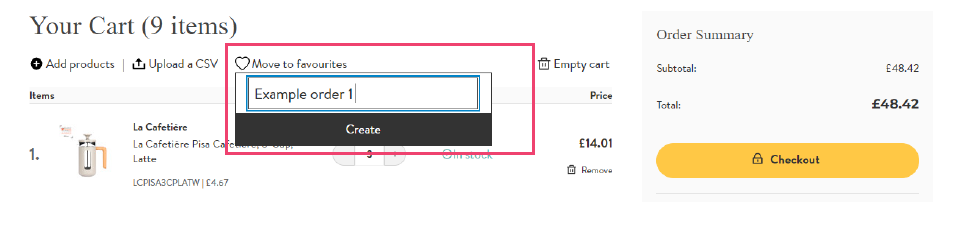
Yes, simply used the 'Move to favourites' area when viewing the cart.
In the cart area, click 'Move to favourites' at the top of the cart and a box will appear. Click 'Add to new list' and a text box will appear for you to name the order. Type your order name and click 'Create'. This will save the order into the 'My favourites' area in your account dashboard. You are able to create as many saved orders as you need.
To add to or amend your saved order? ▼
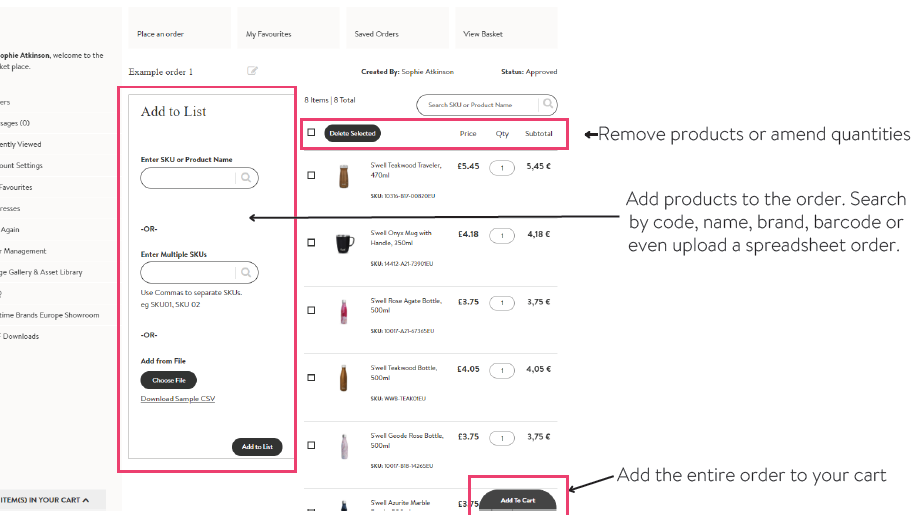
Click the order name in the 'My Favourites' area
How do I look up dimensions / capacity / material / guarantee information for any
product? ▼
This information is available on the product details page of any product in the 'Warranty Information' area.
I need to add a new delivery address to my account ▼
Please email [email protected] with your request and new address details. The new address will be available for you to select for delivery within 2 working days.
How do I view previous orders placed? ▼
Previous orders, including any not placed via Market Place, are saved at the bottom of the dashboard area.
Where can I access images? ▼
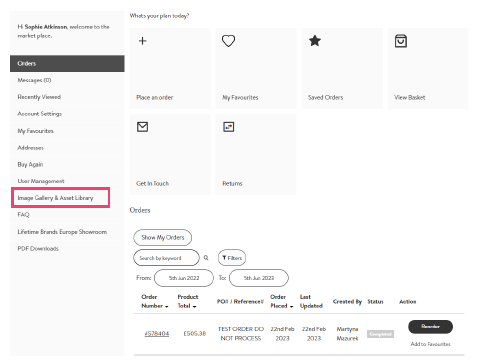
Click the 'Image Galley & Asset Library' link in the Dashboard area and you will be redirected to our online asset library whereyou can easily download images, videos and digital assets.